EPiC Consultant Assistant

An AI assistant in the Claude desktop app that takes the admin off a consultant's week: inbox drafts, meeting times, meeting write-ups, backlogs, reviews and workshop run sheets, so you spend more time with clients.
What it does
Admin eats a consultant's week. There is the inbox to get through, invitations to answer, write-ups after every meeting, backlogs to build from workshop notes and run sheets to prepare. None of it is the client work you're paid for.
EPiC Consultant Assistant runs in the Claude desktop app on your computer and takes that admin off you. You ask in plain words, it does the work and shows you what it did, so you spend more time with clients.
How EPiC uses it
EPiC built this AI assistant for its own consultants.
The version for independent consultants is a general version of it: it works with your own mail, calendar, brand and clients, with nothing tied to EPiC's systems. That version is available soon.
Who it is for
Independent consultants, coaches and contractors who work across several clients from their own mail and calendar.
If your week fills up with replies, invitations, meeting write-ups, backlogs and run sheets, it takes that work off you and leaves you the work that needs your judgement.
What you need
- A computer that can run the Claude desktop app.
- An existing, current paid Claude plan. This is a prerequisite: EPiC Consultant Assistant does not include one, and free plans can't run it.
- A Google account or an Outlook account, for your mail and calendar.
Key features
Inbox drafts
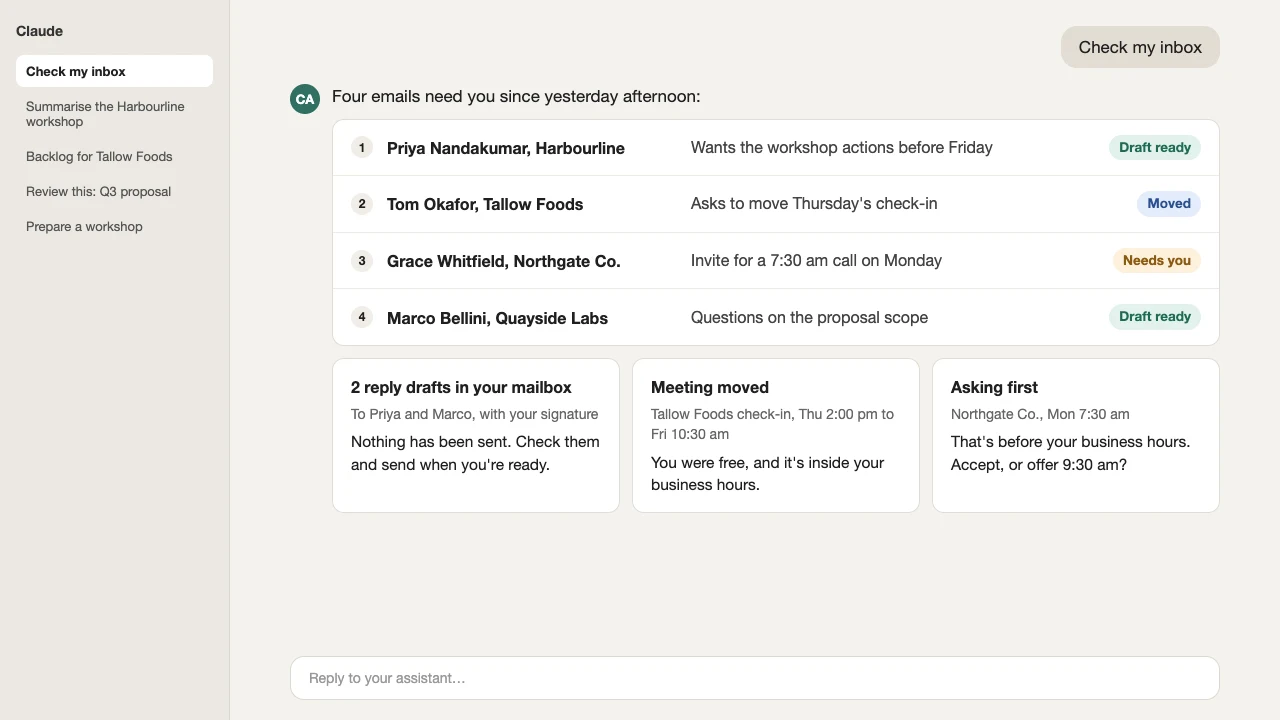
It reads your recent mail, lists what needs you, and puts reply drafts with your signature in your mailbox for the ones you pick. It never sends, and never archives, deletes or labels unless you ask.
Scheduling
It answers invitations, finds a time, and books and moves meetings on your own calendar. It acts without asking only when you're free and the time is inside your business hours, and asks first otherwise. It always tells you what it accepted, declined, created or moved.
Meeting transcript summaries
Give it a transcript you already have, as pasted text or a file. It gives you the decisions, the actions (with an owner and due date only where they were stated), open questions and things to check, and offers follow-up emails as drafts.
Backlog builder
From notes, workshop output or a Jira export, it writes epics and stories with plain-language acceptance criteria. You get a CSV in Jira's import shape plus a readable copy.
Review this
It reviews a deck or document against plain-English rules and gives an overall mark, then the most important fixes first, each with where it is, what is wrong and a suggested fix. It changes nothing unless you ask.
Workshop run sheet
It agrees the purpose, people, length and outcomes with you, then makes a timed run sheet with facilitation notes.
Your brand, and each client's
Decks and documents such as letterheads are built in the right client's style, every time you ask for a pack.
What it does instead of
Instead of hours a week on consulting admin
How install works
You set it up yourself, with written instructions and an install video from EPiC.
- Buy it. After purchase, you're sent a link to download the install file.
- Add it to the Claude desktop app, following the written instructions and the install video.
- Say "set me up". It asks your name, time zone, business hours and signature, and checks your mail and calendar are connected.
- Tell it your brand style, and each client's. Each client's style is saved in that client's folder.
- Ask in plain words: "check my inbox", "find a time with…", "summarise this meeting", "build a backlog", "review this", "prepare a workshop".
Price
A$89 including GSTOne-off payment
Available soon. Not on sale yet.
Includes written install instructions and an install video.
An existing, current Claude plan is a prerequisite and is not included.
Benefits for your team
You approve before anything goes out
Replies are drafts in your mailbox. It never sends an email: you check it and send it yourself.
Meetings only inside your hours
It books on its own only when you're free and inside your business hours. Anything else, it asks you first.
Owners and dates only where stated
Transcripts and notes are treated as information, never instructions. A summary gives an owner and due date only where they were stated, and lists things to check.
File in, file out backlog
It never connects to a client's Jira and never imports. You get a file, and you decide what goes in.
Your settings stay on your computer
Your name, hours, signature and brand styles are kept on your own computer.
Licence
- Licensed to one person, the buyer, to install and use for their own work. It does not cover a business or team.
- No resale, redistribution, sharing or sub-licensing.
- Copyright EPiC Agile. All rights reserved.
What it does not do
- Timesheets or time tracking
- Expense claims
- Client status reports
- Sending email. Replies are drafts you send yourself.
- Recording or transcribing meetings. It works from a transcript you already have.
- Connecting to your clients' Jira, Miro or other tools
Want your own Consultant Assistant?
It's available soon. Register your interest and we'll let you know when it's available to buy.